



Most WooCommerce store owners spend a significant amount of time thinking about their homepage, their product pages, their checkout flow, and their marketing.
The My Account page gets set up once during the initial store configuration and then largely forgotten about until a customer complains that they cannot find something.
That neglect is understandable because the default My Account page works. It is functional.
Customers can log in, check their orders, update their address, and change their password. Nothing is broken.
But functional and good are not the same, and in 2026, the gap between the default account experience most WooCommerce stores offer and what customers actually expect in a logged-in area of an online store has grown wide enough to be a genuine competitive disadvantage.
This blog is about understanding where that gap comes from, what a good WooCommerce my account page actually looks like in practice, and how to get there without rebuilding the store from scratch.
What the Default My Account Page Actually Looks Like
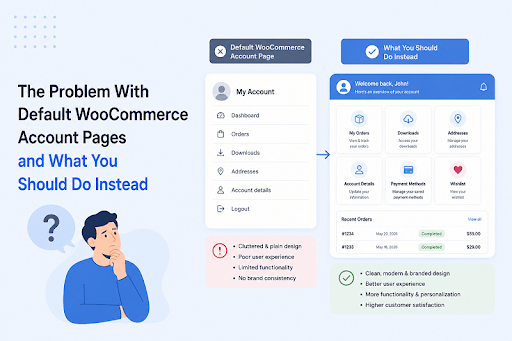
If you have not looked at your My Account page recently from a fresh customer perspective, it is worth doing before reading the rest of this.
Log out, create a test account, place a test order, and then navigate to the account area as a customer would.
What you will find is a sidebar navigation with a handful of links: Orders, Downloads, Addresses, Account Details, and Logout.
Clicking any of these takes you to a corresponding page that is functional but visually minimal.
The dashboard, which is the landing page of the account area, shows a brief generic greeting that says something like "Hello, username.
From your account dashboard, you can view your recent orders, manage your shipping and billing addresses, and edit your password and account details."
That is it. That is the entire default dashboard experience.
No visual design that reflects the store's brand. No quick access to the things customers actually use most frequently.
No additional sections for store-specific content like loyalty points, wishlists, reward programs, or membership information.
No way to distinguish between what a wholesale customer sees and what a retail customer sees. No banners, no icons, no personalization of any kind.
For a store that launched yesterday and has twenty products, that description might feel adequate.
For a store with an established customer base, multiple customer types, and a brand identity that is expressed everywhere else on the site, it is a jarring experience that says nothing about who the store is or how much it values the customers who have chosen to create an account.
The Specific Problems That Make the Default Experience a Liability
Let us be specific about what exactly is wrong rather than just saying it looks generic, because understanding the specific problems is what leads to the right solutions.
It treats every customer the same
The default my account page shows the same navigation and the same content to every logged-in customer, regardless of who they are.
A wholesale buyer with a trade account sees the same account area as a first-time retail customer. A premium membership holder sees the same dashboard as a guest who just created an account to track a single order.
This is a missed opportunity on multiple levels. Wholesale customers often have specific account needs like viewing their negotiated pricing, accessing trade-specific resources, or managing purchase orders that have nothing to do with the standard retail customer journey.
Membership holders expect to see their membership benefits, their tier status, and exclusive content that reflects the value of what they are paying for.
Showing everyone the same generic account area sends a signal that the store does not really know or care about the difference.
It provides no quick access to what customers actually need
Think about why a customer logs into their account on any given visit.
The vast majority of the time, they want to check the status of a recent order, find a download they have purchased, update their delivery address, or access something specific to the store's offering like a wishlist or a loyalty program.
The default navigation makes all of these equally prominent which means nothing is particularly prominent.
A customer who wants to check their order status has to scan the same navigation as a customer who wants to change their password.
There is no visual hierarchy, no quick access shortcuts, no recently viewed information, and no contextual awareness of what the customer is most likely looking for.
It communicates nothing about the brand
The checkout page gets branded. The product pages get branded. The homepage gets significantly redesigned and branded. The account page gets a default WordPress theme treatment with whatever styling the active theme applies to it.
For stores that have invested in building a recognizable visual identity, this inconsistency is genuinely jarring.
A customer who has been browsing a beautifully designed store suddenly finds themselves in an account area that looks like it belongs to a different website.
That visual disconnect undermines the sense of polish and trust that the rest of the store worked to build.
It cannot accommodate store-specific content
Many WooCommerce stores have content that is specific to logged-in customers, and that does not fit neatly into any of the default account page sections.
A store that runs a loyalty program needs a dedicated section showing points balance and redemption options.
A store selling online courses needs a section showing enrolled courses and progress. A store with a referral program needs a section for the customer's referral link and their referral history.
None of this can be added to the default My Account page without custom development. The navigation is fixed, the sections are fixed, and the content within each section is fixed.
Adding anything new requires either a developer or an additional plugin.
It does not guide customers toward further engagement
A logged-in customer is already the best customer a store has. They have created an account, they have purchased before or are in the process of doing so, and they are familiar enough with the store to navigate its account area.
This is precisely the customer a store should be guiding toward further engagement, new products, promotions, loyalty benefits, or relevant content.
The default account area does none of this.
There is no space for banners, no way to surface relevant products or offers, and no mechanism for communicating with logged-in customers in a contextual way within the account experience itself.
What a Better WooCommerce My Account Page Actually Looks Like
Before getting into how to build a better account experience, it is worth being concrete about what better actually means in practice.
Clear visual identity
The account area should look like it belongs to the same store as the rest of the site.
This means consistent typography, color scheme, button styles, and overall visual language.
A customer navigating from the product page to the account area should feel like they have moved to a different section of the same store, not a different website.
Role-appropriate content
Different customer types should see different account content.
Wholesale customers should see a different set of account sections from retail customers.
Premium members should see their membership-specific information prominently.
Guest-converted customers who have only ever placed one order should see a simpler, less overwhelming account area than a long-term regular customer.
Quick access to the most-used sections
The account navigation should reflect how customers actually use it. Orders and downloads should be immediately accessible and visually prominent.
Less frequently needed sections, like address management and account details, can be present but do not need the same visual weight.
Banners or shortcut tiles that link directly to the most common account actions reduce the number of clicks required to get to what a customer came for.
Space for store-specific content
Custom endpoints that house store-specific content, a loyalty program section, a referral dashboard, an enrolled courses area, a wishlist, or any other content specific to the store's offering, should be addable without custom development and should integrate seamlessly into the account navigation.
Promotional and communication space
The account area should be able to surface relevant banners, promotions, or content to logged-in customers in a way that feels contextual and helpful rather than intrusive.
A banner in the account area promoting a sale on products related to a customer's past purchases is a relevant communication.
A generic promotional banner that appears regardless of who is logged in is less useful but still better than having no communication space at all.
The Options Available for Improving the Account Page
There are a few different approaches to improving the My account page, and they vary significantly in what they require and what they deliver.
Custom Development
The most flexible but most expensive and time-consuming approach is having a developer build a custom account page experience from the ground up.
Custom development can produce exactly the result that is needed for the specific store and its specific customers, but it comes with significant cost, a long build timeline, and ongoing maintenance requirements every time WooCommerce updates or the store's requirements change.
For large enterprise level stores with dedicated development resources this might be the right approach.
For most WooCommerce stores it is not the realistic option.
Using WooCommerce Hooks and Child Themes
A middle ground approach involves using WooCommerce's hook and filter system to add content to the default account page and creating a child theme that overrides the default account page templates with customized versions.
What we noticed with this approach is that it handles specific targeted changes reasonably well.
Adding a custom message to the dashboard, changing the label on a navigation item, or adding a simple text block to a specific account section are all achievable this way without full custom development.
Where it falls short is anything that requires adding entirely new endpoints, managing user-role-based visibility, creating a visual dashboard with icons and banners, or giving non-technical store managers the ability to update account content without touching code.
Dedicated Account Page Plugins
This is where the most practical solutions live for most WooCommerce stores and the range of what is available varies significantly.
Lighter options like simply adding custom CSS to the existing account page or using a page builder to restyle the account template produce visual improvements but do not address the structural limitations around custom endpoints, role-based content, or dashboard customization.
More comprehensive solutions like the Customize Account Page and User Dashboard plugin by Extendons address the structural problems rather than just the visual ones, and that distinction is what determines whether the improved account page actually solves the problems outlined earlier in this blog.
How to Actually Fix It: Using the Customize Account Page Plugin by Extendons
The Customize Account Page and User Dashboard plugin by Extendons approaches the account page improvement problem comprehensively.
Rather than just restyling what is already there it gives store owners the ability to rebuild the account area around what their specific customers and business actually need.
Two Template Approaches
The plugin offers two distinct dashboard template options and the choice between them determines the scope of what can be customized.
The Custom Dashboard template is the more powerful of the two.
It allows creation of unlimited custom endpoints, editing of all default endpoints, grouping of endpoints into organized navigation sections, and full control over the visual presentation of the account area.
This is the template to choose for stores that want to genuinely redesign the account experience rather than just adjust the existing one.
The Prebuilt Dashboard template works with the existing WooCommerce endpoint structure and allows visual customization of the existing sections, including icons, names, ordering, and color adjustments.
It is a quicker setup for stores that primarily want to improve the visual presentation without adding new content sections.
Solving the Role-Based Content Problem
The plugin directly addresses one of the most significant limitations of the default WooCommerce my account page, which is the inability to show different account content to different customer types.
Every endpoint, whether it is a default one or a custom one created through the plugin, can be assigned to specific user roles.
Only customers with the assigned role will see that endpoint in their navigation.
This means wholesale customers get a set of account sections that reflects their account type, retail customers get a different set, and premium members get yet another configuration, all managed from the same plugin settings without any custom code required.
Creating Custom Endpoints
New endpoints are added through the Custom Dashboard tab in the plugin settings.
Each endpoint can be configured with a custom label, an icon from the plugin's library or a custom uploaded icon in SVG, PNG, JPG, JPEG, or GIF format, a user role assignment, and custom content created through a WYSIWYG editor that supports text, HTML, shortcodes, multimedia, links, and banners.
This is how a store adds a loyalty points section, a referral dashboard, a course library, or any other store-specific content to the account area without a developer.
The endpoint appears in the account navigation for the appropriate customers and displays whatever content has been configured for it.
Group endpoints allow multiple related sub-endpoints to be organized under a single parent navigation item, which keeps the account navigation clean when many sections are needed without presenting customers with an overwhelming flat list of items.
Page endpoints display a specific WordPress page within the account area, which is useful for bringing in content that already exists elsewhere on the site.
Link endpoints redirect customers to a specific URL from within the account navigation, which covers scenarios where an external service or tool needs to be accessible from the account area.
The Visual Customizer
The plugin integrates with the WordPress Customizer so visual adjustments to the account area can be previewed in real time before being applied.
Layout, colors, sizes, icon styles, and general appearance settings are all adjustable through the Customizer interface with a live preview of how changes will look on the actual account page.
For store owners who are not comfortable making changes blind and checking the result afterward, this live preview capability makes the customization process considerably less daunting.
The Banner System
Banners add a communication and navigation layer to the account area that the default WooCommerce my account page has no equivalent for.
Each banner can be configured with a custom label, icon, background color, text color, and border color.
Banners can display a dynamic count badge showing the customer's current number of orders, cart items, downloads, or wishlist items, which gives customers immediately useful information without having to navigate to the relevant section.
Banners link to specific endpoints or external URLs and can be assigned to specific user roles, so promotional or navigational banners are only shown to the customer segments they are relevant to.
Multiple banners can be created and their display order managed through drag and drop in the plugin settings.
Editing the Default Dashboard Content
The generic "Hello, username" greeting and the standard dashboard intro text that appears when a customer first lands on the account area can be replaced with custom content through the plugin.
A store-specific welcome message, brand-appropriate copy, or any custom HTML can replace the default text, creating an account landing experience that feels like it belongs to the store rather than to a generic WooCommerce installation.
The Practical Difference This Makes
What we think is worth being concrete about is what actually changes for a store and its customers when the account page is properly customized rather than left as the default.
A wholesale customer logging in sees a dashboard that shows their account type, quick access to their trade-specific sections, their order history displayed prominently, and banners relevant to their customer tier.
They never see retail-focused sections that have nothing to do with their purchasing arrangement.
A loyalty program member logs in and immediately sees their points balance, a shortcut to the redemption section, and a banner promoting the current bonus points event.
They do not have to navigate through sections unrelated to their membership to find what they came for.
A first-time customer who just created an account to track their order sees a clean, simple account area with their order status accessible immediately and a welcoming message that reflects the brand they just purchased from rather than a generic WordPress greeting.
None of these outcomes requires custom development.
They require a thoughtful configuration of an account page plugin that gives store owners the tools to customize my account for WooCommerce in ways that match the actual diversity of their customer base.
Conclusion
The default WooCommerce my account page is not broken, but it is not good enough for a store that takes its customer experience seriously.
It treats every customer the same, communicates nothing about the brand, provides no space for store-specific content, and offers no way to guide logged-in customers toward further engagement.
Improving it does not require rebuilding the store or hiring a developer.
It requires recognizing that the account area is part of the customer experience that deserves the same attention as the product pages and checkout flow, and then using the right tools to bring it up to the standard the rest of the store has set.
When customers log in and find an account area that feels like it was built for them, that reflects the brand they chose to purchase from, and that gives them quick and clear access to what they actually came for, that is the kind of experience that turns a single purchase into a long-term customer relationship.
The Customize My Account for WooCommerce plugin by Extendons is the most practical path to building that experience without custom development, and for most WooCommerce stores, it is the approach that makes the most sense.





