Build a whole Joomla website without writing code
Header, pages, footer — assemble every part of the site on one live canvas and watch each change land as you make it. Drag, drop, publish.
Edit on the live page
No preview toggle, no reload. Type on the canvas, drag a section, change a colour — the page you are editing is the page a visitor gets.
Control down to the pixel
Colour, type, spacing, position — every value is exposed, and every one of them can hold a different setting on desktop, tablet, and mobile.
Start finished, or start empty
40+ elements and 24 layout kits covering landing pages, portfolios, and stores — open a finished layout and edit it, or begin on a blank canvas.
Nine controls that decide how the site turns out
Most builders hand you a canvas and stop there. These are the settings you reach for on the third day of a build, when the layout is right and the details are not.
Real-Time Editing
Type straight onto the heading and watch the type scale, colour, and spacing update as you go. There is no preview mode to switch into, because the canvas is the page.
Responsive Design
Every setting can hold a different value per breakpoint. Switch to tablet or mobile, change the number, and desktop keeps the value you already approved.
Flexible Layout Engine
Drag a column edge to redistribute the row, nest a row inside a column for a layout the grid alone cannot express, then duplicate the whole thing in one click.
Global Colors & Typography
Set the palette and type scale once as named values. Change Primary later and every heading, button, and border built on it follows across the site.
Scroll Animations
Pick an entrance, set its duration and delay, and stagger a row so its cards arrive in sequence. Readers who ask for reduced motion are served the static page.
Display Conditions
Decide where a layout appears by stacking rules — this menu item, that user group, one language — so a single template covers cases you would otherwise duplicate.
Custom Positioning
Lift an element out of the flow and place it against the section edge with X and Y offsets — absolute where there is room, back to static on mobile, no CSS either way.
Joomla Modules & Articles
Drop a live Joomla module or article straight onto the canvas. It renders in place with its real content, so you stop routing design decisions through module positions.
Margins & Padding
Edit the box model directly, negative values included — the shortest route to sections that overlap deliberately rather than by accident.
Trusted by Joomla professionals
Verbatim Quix reviews from the Joomla Extensions Directory.
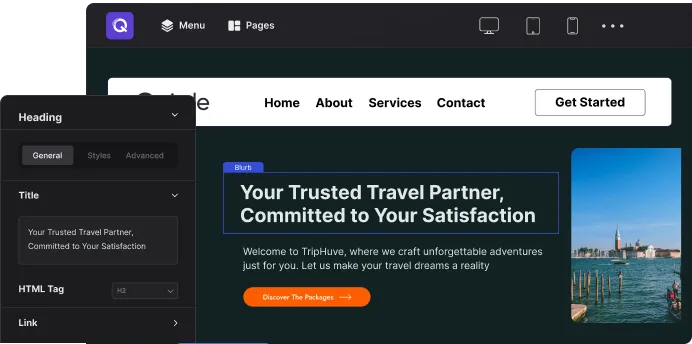
A WYSIWYG editor that really is what you get
Joomla's editor shows you a rough approximation and leaves the rest to the template. Quix removes the gap: the heading you click is the heading that ships, styled by the same values, in the same place, on the same page.
- Click any text and edit it where it sits
- Settings panel changes render on the canvas, not on save
- No shortcodes left behind if you ever remove Quix
The small things you only miss once they are gone
None of these sell a licence on their own. Together they are the difference between a build that takes an afternoon and one that takes a week.
Auto Save
Your work is continuously saved and backed up automatically. No need to click the save button again and again.
Revision History
Use the revision history where your entire page creation process is saved and easily re-trace anytime, anything.
Quick Copy/Paste
Copy a section, column, or element and paste it elsewhere on the page or into another page on the same site. No export, no import file.
Undo & Redo
Apply quick undo or redo if there happens to be any inaccuracy. Quix is best for its instant capabilities.
Custom CSS Control
Get a more personalized and customized look by adding custom CSS to any section, column, element, or page.
Inline Text Editing
Text editing and styling are even more intuitive with the inline text editing feature. Editing content has never been this satisfying.
Custom Icon Library
Use Quix's extensive custom icon library with handcrafted vector icons that are infinitely scalable and expandable.
Unit System
Every numeric field takes px, em, rem, %, vw, or vh. Pick the unit the layout actually needs instead of converting in your head.
JCE Editor Support
Long-form article content still opens in JCE or whichever Joomla editor your team already uses. Quix does not force everyone onto a new one.
The complete Joomla design system
Vibrant colors, clean spacing, and loads of new features to create websites you're proud of. Be creative and have fun!
Background Images, Colors, Gradients, & Videos
Play with the background of your site and stand out from others. Apply custom background colors, gradients, images, and videos to any element and improve the way your site looks.
Shape Dividers
Expand on your website design with 22+ different customizable shape dividers. Add striking shapes to separate sections or divide rows and columns for a more engaging, creative site layout.
Live Copy & Paste from One Site to Another
Imagine being able to copy and paste any design you want from one site directly into the other without exporting or importing. The live copy will allow you to copy your local changes and apply them on a live website.
Drag & Drop Media Manager
Simple yet powerful first-of-its-kind Drag & Drop media manager for Joomla. Quix Media Manager is your best friend when it comes to managing media files and folders all in one place.
Save & Reuse Everything
Send any block, section, or finished page to your library and drop it into the next build. Save it as a global element instead and it stays linked — edit the original once and every page carrying it updates.
Before you commit
The questions agencies ask us on the call, answered here instead.
Ask us something else →Which Joomla version does it need?
Quix 6 targets Joomla 6 and PHP 8, written against current Joomla APIs rather than retrofitted from an older major. Upgrading from Quix 5 carries existing pages and layouts over intact.
What happens to my site if I stop renewing?
Nothing. The licence covers updates and support for the year, not the right to run the software — your pages keep working exactly as they are. You simply stop receiving new versions and support until you renew.
How many client sites does one licence cover?
It depends on the plan: Quix Pro covers one site, Business covers five, and the Agency plans are unlimited. Both annual and lifetime terms are available for each.
Are we locked in if we later remove Quix?
Quix builds real markup rather than leaving shortcodes in your article content, so removing it does not scatter unresolved tags across the site. Pages built in Quix do stop rendering as designed, as with any builder.
Can we try it before paying?
Yes — there is a free edition of the builder, and the hosted demo is the full editor rather than a walkthrough. Paid plans are also covered by a 14-day money-back guarantee.
Build the next client site on it
Joomla professionals have been shipping work on Quix since 2012. Fourteen years of releases, and a 14-day money-back guarantee on every plan.
Endless possibilities with powerful elements
From header buttons to Joomla modules — every option you need to fine-tune your website, all inside Quix.