A media manager you don’t have to train clients around
JMedia replaces Joomla’s core media manager with a real file manager — and keeps every folder you already have.
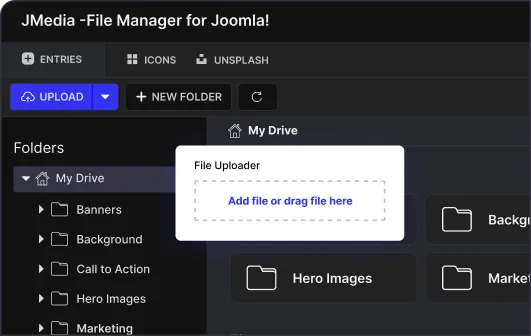
Directory tree, right-click context menu, batch operations, type filters, and uploads from your computer, a URL or Unsplash. There is no migration and nothing to re-upload; it reads the media setup that is already there.
One-site licence, one year of support and updates. Prices exclude VAT.
Right-click, like every other file manager
Rename, download, adjust permissions and read file info from the context menu, where anyone who has used a computer already expects to find them. Copy, move and delete work on a selection, so reorganising a shoot means one drag rather than forty round trips. This is the part that decides whether a client updates their own images or emails them to you for the next three years.
Directory tree
The whole folder structure stays visible down the left. Finding last year’s campaign images is navigation, not a guess at what the folder was called.
Sorting and ordering
Sort by name, size, type or date, ascending or descending. The most recent upload is one click away instead of somewhere in a wall of thumbnails.
Grid and list views
Toggle between them from the top right. Grid to recognise an image, list to compare sizes and dates.
Search and type filters
Filter to images, documents, video or audio, or search by name. Both narrow a bloated library to the handful of files you meant.
Shareable URLs and downloads
Copy a file’s public URL or download it without leaving the manager — the two things you otherwise open an FTP client for.
File type restrictions
Decide what may be uploaded before a client uploads it. The media library stops collecting whatever happened to be on someone’s desktop.
Upload from anywhere, including Unsplash
Most of the friction in a media library is not storing files, it is getting them in from wherever they actually live.
From your computer
Drag files in or pick them from a dialog, straight into whichever folder you are standing in. No staging step and no separate upload screen.
From a URL
Paste a link and JMedia fetches the file itself. The download-to-desktop-then-reupload detour disappears entirely.
From Unsplash
Search Unsplash inside the media picker and place an image without ever leaving Joomla — the one thing competing managers do not do.
“All there that is needed. It really makes the impression that the development of JMedia is based on the focus of user friendly handling. It’s easy to use.”
Questions before you install
Can JMedia replace Joomla’s default media manager?
Yes. JMedia can directly replace the default Joomla media manager and become the site’s core media management tool, rather than sitting alongside it as a second place to look.
Will my existing media library and folders still work?
Yes. JMedia is designed to integrate with your current Joomla media setup, so existing folders and files carry over as they are. There is no migration step and nothing to re-upload.
Is JMedia compatible with Joomla 6?
Yes. JMedia is built for Joomla 6 and tracks each release, so it does not become the reason an upgrade gets postponed.
Which PHP versions are supported?
JMedia supports current PHP, with a minimum of PHP 8.1, in line with what recent Joomla releases expect.
What file types does JMedia support?
Images including JPEG, PNG, GIF and SVG, plus documents, video, audio and other common file types. Which of them may be uploaded is yours to restrict.
How do I download and install JMedia?
Log in to your ThemeXpert dashboard, download the full package from the download panel, and install it through Joomla’s normal manual installation process.

Taking you to secure checkout
ThemeXpert is part of Convers Labs. Your order and payment are handled on our own billing platform — not a third-party reseller.
my.converslabs.com
Redirecting you now…
Continue to checkout →