How to change Joomla! Contact form layout?

How to change Joomla! Contact form layout?

A lot of our users don’t like Joomla’s default contact form accordion layout and question us how to change it. It’s really very easy to change the layout without writing any code! In this tutorial i’ll show you how to do this.

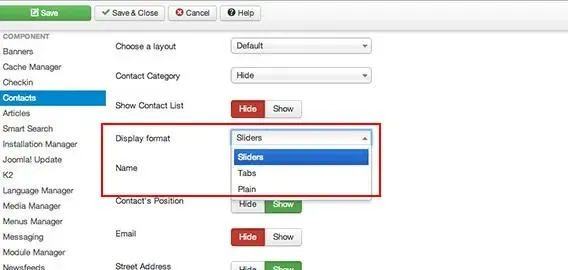
Go to Contact component and click the Options button on the top right. You can see an option Display format. Now click the list and it will show 3 options:

  1. Sliders
  2. Tabs
  3. Plain

tut-contact-layouts.jpg

1. Sliders: This is the default accordion layout.

2. Tabs: Tab style layout

3. Plain: Basic plain layout

If you want the old fashioned Joomla! form then plain would be your choice.

Related reading

Joomla

How To Fix A Hacked Joomla Website

Do you know what is a webmaster's biggest nightmare? You're right. It's the hackers. Every now and then, website administrators get to deal with hackers. It's not possible to make your website 100%...

Joomla

How To Customize Joomla Template

Customizing any of our joomla templates is very easy. It requires only very basic knowledge of CSS. If you do not have knowledge of basic CSS, don't panic - there is an easy way to customize...

Joomla

7 Must Have Joomla Extensions for Every Site

Finding a right Joomla extension for your site is always painful when you have choice of 7K+ extensions. Right now, Joomla Extension Directory (JED) contains 7943 extensions and choosing right...